
SmartDraw's intelligent formatting engine gives you the ability to automatically format and connect shapes in a diagram. Intelligent formatting makes creating diagrams like flowcharts, organizational charts, and mind maps a breeze.
To see it in action, let's look at making an organizational chart. Start with a blank org chart template and simply click buttons to add shapes. You can click on the yellow action buttons around a shape, or simply your keyboard by holding down Ctrl and any of the arrow keys. Intelligent formatting makes sure that everything is automatically connected, aligned, and evenly spaced.
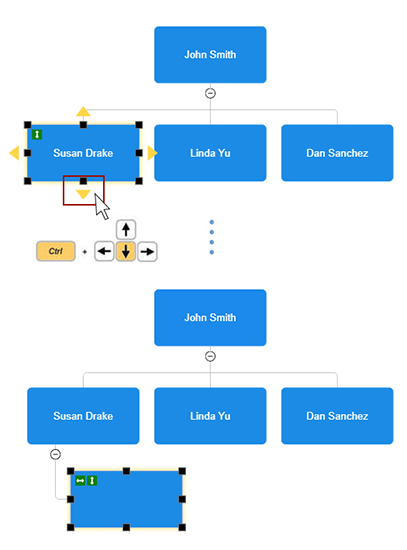
Inserting a Shape Using Intelligent Formatting
Intelligent formatting allows you to insert a new shape into an existing diagram without having to manually make room for it. To insert a new position, simply click the action button on the right or use Ctrl+right arrow and the remaining boxes will move to accommodate the new shape without you having to rearrange or reconnect parts of your diagram. Everything is done for you automatically.
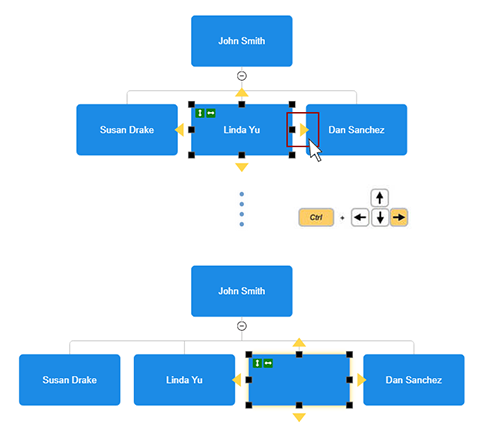
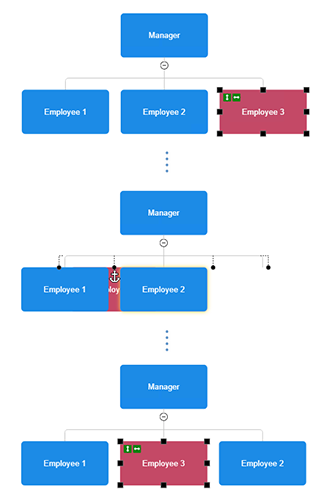
Moving Shapes
If you move a shape from one place to another, just drag it and everything will realign and reconnect perfectly.
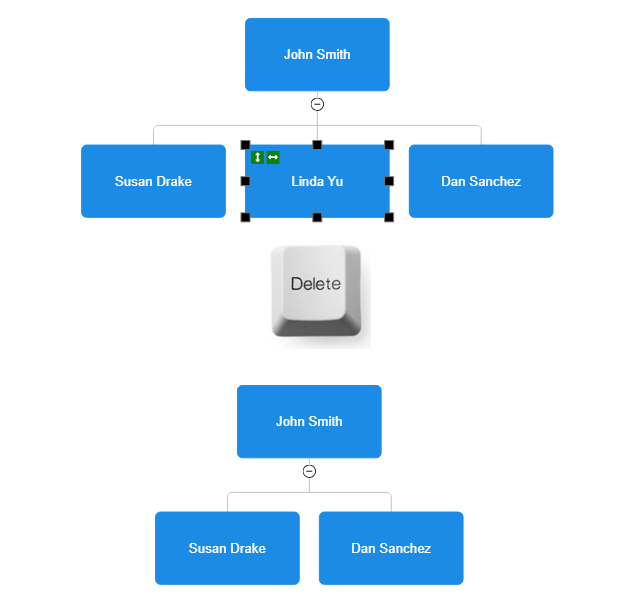
Deleting a Shape
You can also delete shapes and your diagram will automatically reconnect and heal.
This is the power of intelligent formatting.